Chatty DB
AI Chat
A conversational SQL assistant. Ask in plain English, get an answer backed by real query results.
What it is
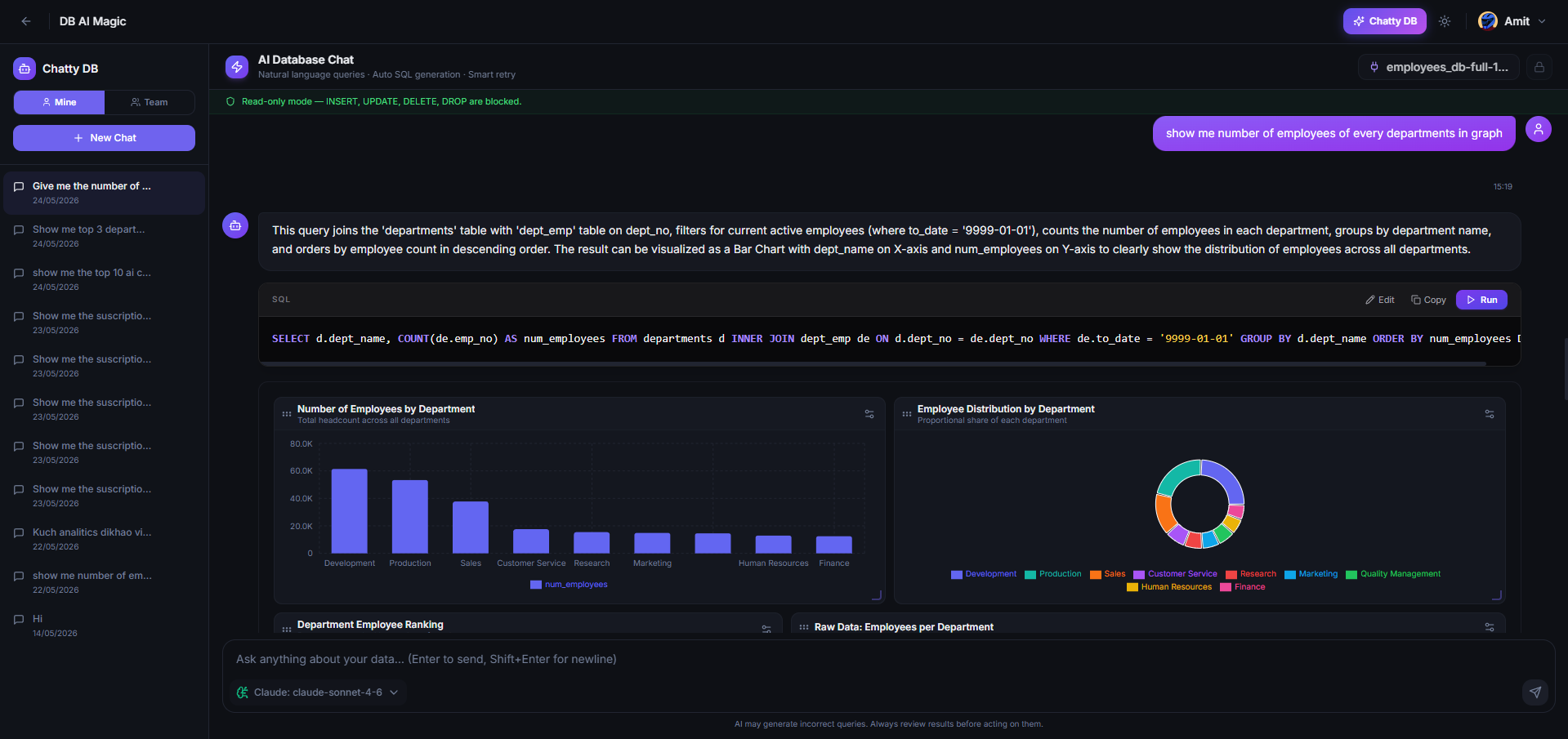
AI Chat is a dedicated chat surface where you converse with your data. Pick a connection, ask a question, and the assistant writes SQL, runs it, and shows you the result as a table or chart — all in one back-and-forth.
What it can do
- Answer ad-hoc questions about any connected database
- Show results as tables, charts or KPIs depending on the shape
- Auto-retry failing SQL with feedback from the database
- Remember context across the conversation
- Cite the SQL behind every answer so you can audit it
How it thinks
- You ask a question.
- The assistant reads the schema of the selected connection.
- It writes a draft SQL query and runs it.
- If the query fails, it reads the error and tries again — up to a few times.
- The final, working query plus the result is shown in the message.
It works best on read-heavy questions
AI Chat shines on “tell me about my data”questions — top customers, recent activity, anomalies. For mutations and migrations, use the Query Editor where you can review and run yourself.
Privacy and quotas
Each plan includes a number of AI queries per month. On Pro and above you can bring your own AI provider key (OpenAI, Anthropic, Google, NVIDIA, or OpenRouter — the last two include free model tiers) so the queries go directly from your workspace to your chosen provider.
Continue to Getting Started with AI Chat for the actual flow.